


MD170B Digital watch face
4.6203.00 Reviews
App Specs
- Version
- Varies with Device
- Updated On
- License
- $2.99
- Downloads
- 50,000+
- Developer
- Matteo Dini MD ® Watch Faces
- Categories
- Personalization
- Platform
- Android
Screenshots
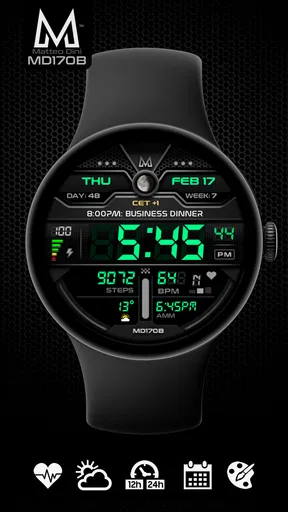
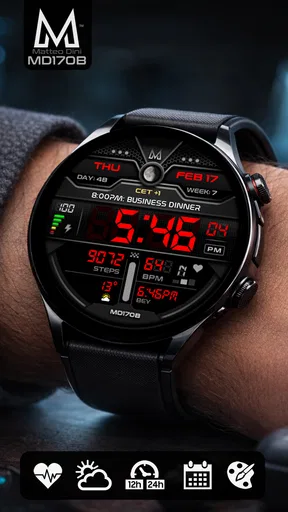
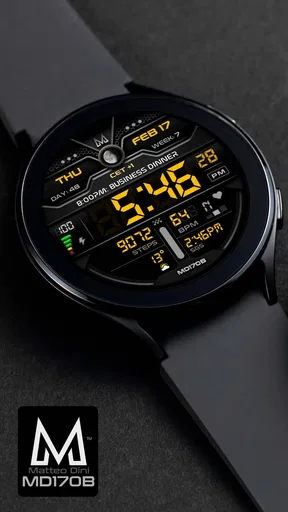
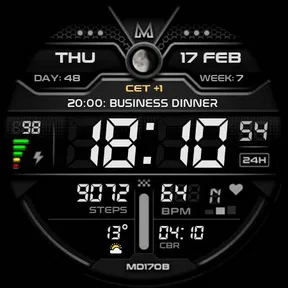
 Analysis by AppCompare
When I judge a watch face, I look beyond whether it looks good in a product image. I want to know if I can read it quickly, make sense of its layout without a lot of fiddling, and rely on it in the ordinary moments when checking a watch should be effortless. MD170B: Digital watch face is a Wear OS personalization app by Matteo Dini MD ® Watch Faces, and its strongest appeal is the chance to make a digital display feel more like your own. My view is positive, with an important qualification: a face can offer a clear design and customization without automatically being accessible to every wearer or useful in every situation.
Readable at a glance, with a layout worth checking
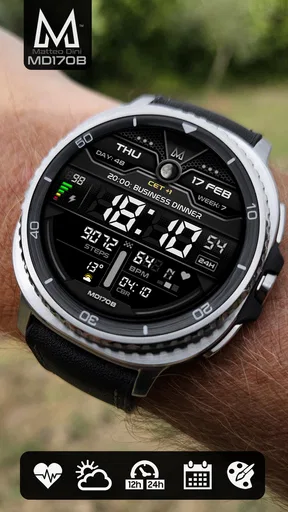
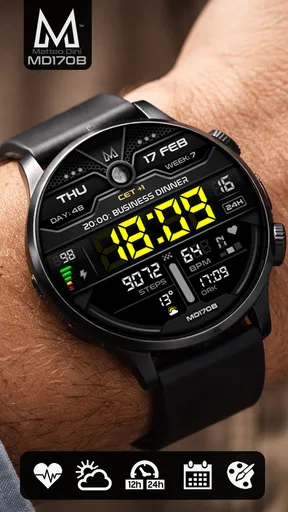
The central job of a watch face is to show the time quickly. MD170B’s digital presentation gives it a direct, contemporary feel, and I found the screen easier to scan than a more decorative face that makes the time compete with ornamental details. That matters when I am walking, carrying something, or glancing down between tasks rather than stopping to study my wrist. A tidy composition helps, but readability still depends on how a particular wearer sees the display and how the watch is set up.
The customization is useful because people do not all prioritize the same information. I would start by deciding what I genuinely need to see at a glance, then use the available personalization and complication options to make that information easier to find. A practical tip is to avoid filling every available area just because it can be customized. A face that shows only the details I use regularly can be quicker to read than one crowded with choices.
For anyone wondering whether this is a phone app or a watch feature, it is a digital watch face intended for Wear OS. The experience is therefore centered on the watch, not on browsing a large collection of phone tools. Its short name is MD170B, and the app’s appeal is focused: change the everyday appearance and arrangement of a compatible Wear OS watch rather than turn the watch into something entirely different.
Customization, comfort, and different ways of using a watch
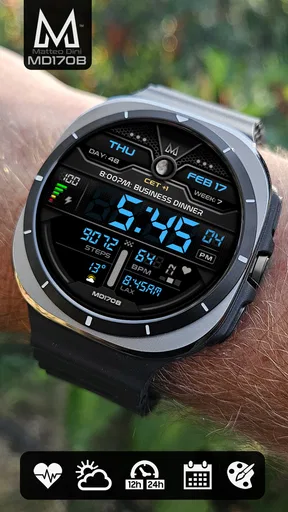
Color and display choices can make the face feel more personal, but they can also affect how comfortably someone reads it. I would try the design in the lighting and setting where I check my watch most often, rather than choosing a color only because it looks striking in the setup screen. If a combination is hard to distinguish at a quick glance, a calmer, higher-contrast choice is likely to be more useful. That is a general way to approach personalization, not a claim that the app provides a dedicated accessibility mode.
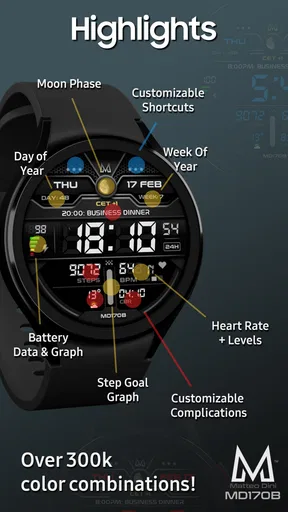
Complications can make a watch face more useful without opening another screen, but their value depends on what the wearer actually uses and what the watch makes available. A calendar detail may suit someone who checks appointments throughout the day; another person may prefer a fitness-related glance or simply a clean clock. I would treat these as choices to test rather than assume every complication will be available or equally helpful on every device. Keeping the most important item in the easiest place to notice is a small adjustment with a real effect on daily use.
Touch and navigation deserve the same practical thought. A wearer who finds small controls difficult may prefer to make the setup changes carefully, then keep the finished face simple instead of repeatedly adjusting it. Someone sensitive to visual clutter may likewise benefit from choosing only the information they need. These are sensible ways to reduce friction, but they are not a substitute for the watch’s own accessibility settings or for a larger screen when one is needed.
Worth Reading Before You Choose

EA SPORTS FC Mobile 26 Is a Bigger Football Game, but It Takes Time

Flipboard Shows What News Apps Must Do Beyond the Feed

Switching to Android Auto Means Rethinking Your Driving Routine

Google Calendar Makes a Crowded Week Easier to Manage

Ludo King Makes the Most of the Minutes Between Plans

Baby Panda World Brings Quick Play to Modern Phones, but Its Game Library Feels Busy
Where it fits—and where another option may be better
Compared with leaving a watch on its default face, MD170B makes sense if that standard look feels too plain or does not match the way I want to see information. Compared with a heavily illustrated or analog-style face, its digital direction may suit someone who favors a straightforward, modern appearance. On the other hand, a wearer who wants a traditional dial, elaborate artwork, or a face designed around a particular accessibility need should compare alternatives rather than assume this one will be the best fit.
A realistic use case is a busy morning: I check the time while getting ready, glance at a calendar complication before leaving, and later look at the watch between errands without taking out my phone. In that routine, a clean arrangement can make the watch more convenient. But if I am in bright outdoor light, moving quickly, or unable to see small details comfortably, the practical test is whether the face remains legible on my actual watch—not whether the design looked appealing during setup.
The app is rated for Everyone, costs $2.99, and has a 4.6 average from around 1,700 ratings. It has over 50,000 installs and was released on February 17, 2022. Those figures suggest it has found an audience, but they do not tell me whether its appearance or layout will suit a particular wrist, vision preference, or watch model. I would treat the purchase as a choice about a specific look and Wear OS experience, not as a guarantee that every device or personal setup will feel identical.
A measured recommendation for inclusive use
My recommendation is for Wear OS owners who want a customizable digital face and are willing to spend a little time deciding what information belongs on it. It is less compelling for someone who rarely changes their watch’s appearance, wants a purely analog design, or needs accessibility features that have not been established for this face. Before settling on it, I would check the display in normal daily conditions, simplify the layout, and confirm that the watch and its available complications suit the way I use it.
For me, the best measure of an inclusive watch face is not how many options it advertises, but whether the person wearing it can comfortably get the information they need. MD170B offers a promising starting point for a personalized digital layout, while the final experience still depends on individual vision, dexterity, device, and context. It is worth considering when that combination fits; when it does not, a simpler face, a larger display, or the watch’s built-in accessibility settings may be the more thoughtful choice.
Hey there, fellow tech enthusiast! So, I’ve just spent some quality time with the MD170B: Digital watch face app. Let me tell you, it’s quite the nifty little addition for anyone looking to spruce up their smartwatch game. Whether you’re a style-savvy trendsetter or someone who just loves a bit of digital flair, this app might just be what you’re looking for.
First Impressions: A Sleek and Modern Aesthetic
Okay, so the first thing you notice about the MD170B: Digital watch face is its sleek design. This app doesn’t just slap a clock on your wrist; it makes sure you look good while keeping track of time. With its minimalist yet modern aesthetic, I found myself constantly admiring my wrist throughout the day. The digital layout is clean, crisp, and super easy to read, which is a huge plus when you’re on the go.
The interface is intuitive, and even if you’re not a tech wizard, navigating the settings is a breeze. I mean, who wants to spend ages fiddling with settings when you can have a chic watch face ready in seconds, right?
Customization Options Galore
Now, let’s talk about customization. If you’re anything like me, you love the idea of making things your own. The app offers a range of customization options, allowing you to tweak everything from the color scheme to the display styles. Want your watch face to match your outfit? No problem! You can easily switch up the colors and design to suit your mood or occasion.
One of my favorite features is the ability to add widgets. Whether you need quick access to your calendar, weather updates, or fitness stats, it’s all right there on your wrist with a simple swipe. It’s like having a tiny personal assistant strapped to you!
Performance and Functionality
In terms of performance, the app runs smoothly without any noticeable lags. It integrates seamlessly with various smartwatch models, which is always a relief because nobody likes compatibility issues ruining the fun. The battery consumption is also reasonable, so you won’t find yourself scrambling for a charger midday.
One thing I particularly appreciated is the attention to detail in the animations. The transitions are smooth, and the overall functionality is incredibly responsive. It’s clear that the developers put a lot of thought into ensuring a top-notch user experience.
Why You Should Consider It
If you’re on the fence about trying out a new watch face, let me give you a few reasons to consider MD170B. It’s more than just a pretty face (pun intended); it enhances your smartwatch’s functionality while adding a dash of personal style.
- Stylish Design: Perfect for those who want a modern, clean look.
- Customizable Features: Tailor it to fit your lifestyle and aesthetic.
- User-Friendly Interface: Easy to navigate, even for beginners.
- Seamless Integration: Works well across different smartwatch models.
Plus, it’s a conversation starter! I can’t tell you how many times people have asked me about it, which is always a nice bonus.
Wrapping It Up
All in all, MD170B is a fantastic addition to any smartwatch lover’s collection. It combines style, functionality, and customization in a seamless package. If you're looking to upgrade your digital watch face, this app is definitely worth a download. You can find it on both Android and iOS platforms, so go ahead and give it a try!
And remember, time’s ticking—make sure you’re doing it in style!
Pros
- Customizable watch face options.
- Easy-to-read digital display.
- Battery-efficient design.
- Supports multiple languages.
- Seamless integration with most devices.
Cons
- Limited free customization features.
- No weather display option.
- Lacks advanced health tracking.
- Ads in free version.
- Requires frequent updates.
FAQs for MD170B Digital watch face
What customization options are available with the MD170B digital watch face?
The MD170B digital watch face offers a wide range of customization options, allowing users to personalize the display to match their style. You can change the color scheme, adjust the layout, and select from various widgets like weather, calendar, and fitness stats. This ensures your watch face is both functional and aesthetically pleasing.
Is the MD170B digital watch face compatible with all smartwatches?
The MD170B digital watch face is designed to be compatible with most Android and iOS smartwatches. However, it's always best to check the compatibility list on the app's download page to ensure it works with your specific device. Regular updates often expand compatibility, so keep your app updated.
How does the MD170B digital watch face impact battery life?
The MD170B digital watch face is optimized for efficiency, but like any app, it can affect battery life depending on usage. Utilizing features like animations or always-on display may drain the battery faster. Users are advised to adjust settings according to their battery preferences to maintain a balance between functionality and battery life.
Are there any in-app purchases or subscription fees with the MD170B watch face?
While the MD170B digital watch face offers a free version with basic features, there are optional in-app purchases available. These may include premium themes or additional widgets. There is no mandatory subscription fee, allowing users to enjoy the app without ongoing charges, unless they choose to upgrade.
What are the unique features of the MD170B digital watch face?
The MD170B digital watch face stands out with its unique features, such as a dynamic color changer that adapts to the time of day, and a detailed health monitoring widget that syncs with fitness apps. Its user-friendly interface and seamless integration with smart devices make it a popular choice for smartwatch enthusiasts.


